How to Measure AI Search Visibility with Search Console, Clarity and GA4
Hot on the heels of this morning’s Dev meeting, this week we thought we’d share what we’re seeing across the different tools when it comes to measuring and monitoring AI search visibility and more importantly, how you can use that information to your advantage. We would caveat that this information was correct at the point of writing, but as you know these things change quickly!
For years, measuring organic search performance followed a familiar pattern. Look at impressions, rankings, clicks and conversions. If traffic fell, investigate lost positions, weaker demand or a technical problem.
That model is no longer enough.
People have not stopped looking for information. They are changing where and how they look for it. Instead of opening several search results, reading multiple articles and assembling an answer themselves, they can ask ChatGPT, Gemini, Copilot or Perplexity and receive a condensed response immediately.
For businesses, this creates an awkward measurement problem. A website can still influence a decision without receiving the visit that once proved it. At the same time, a decline in informational traffic can look alarming even when it has little effect on sales.
The important question is no longer simply, “Is organic traffic going down?” It is:
“Which searches are disappearing, where is that behaviour moving, and is the change affecting revenue?”
Answering that requires more than one analytics platform.
Not all website traffic has equal commercial value
The first step is to separate two audiences that conventional reporting often blends together:
- People using the website to evaluate, enquire or buy.
- People visiting because an informational page answered a question.
Imagine a pump retailer with articles such as “What type of shower pump do I need?” or “Why is my pump making this noise?” Historically, a user would search the question, open one or more articles and work through the advice.
An AI assistant can now retrieve the relevant information from several sources and present a single answer. The retailer’s article may help produce that answer and may even be cited but the user has less reason to visit the website.
That lost session is not necessarily a lost customer. It may simply be a lost research visit.
This distinction matters. If 20% of informational traffic disappears while qualified product visits, enquiries and sales remain stable, the headline traffic decline is not the commercial disaster it first appears to be. If high-intent visits and conversions are also falling, the business has a very different problem.
Reddit offered an earlier version of this behavioural shift. Instead of visiting numerous specialist sites, users could ask one community and receive several answers in one place. Generative AI takes the same convenience much further: it searches, compares and summarises on the user’s behalf.
Traffic reports therefore need to distinguish between attention, influence and commercial action. They are related, but they are not the same thing.
Google Search Console: visibility inside Google’s AI results
Google Search Console remains the best starting point for understanding visibility within Google Search.
Its standard Performance report provides clicks, impressions, click-through rate and average position, with data that can be grouped by query, page, country, device, search appearance and date. But Google’s newer generative AI performance report gives a more specific view of appearances within Generative AI Features.
The report is useful, but deliberately high-level. It currently focuses on impressions and allows these to be viewed by page, country, date and device. It does not provide the queries behind those AI impressions or show clicks in the same depth as the standard search report. Access is also still being rolled out, so not every property will see it.
This makes Search Console valuable for questions such as:
- Is our content appearing more or less frequently in Google’s generative search experiences?
- Which pages are receiving those impressions?
- Is visibility changing by market or device?
It is less useful for explaining exactly why the content appeared, what the user asked, or what commercial outcome followed.
There is another important complication: the generative AI report covers AI Overviews and AI Mode within Google Search. It is not a universal view of Gemini across every Google product, app or embedded experience. Google also provides a separate generative AI report for Discover. No single Google report reconstructs every possible AI touchpoint.
In short, Search Console tells you whether you are being seen in Google’s AI search environment. It does not tell the whole customer story.
Microsoft Clarity: citations, authority and AI-referred behaviour
Microsoft Clarity approaches the problem from a different direction.
Its AI Visibility citation dashboard is designed to show how a site’s content is referenced in AI-generated answers. It can report:
- page citations
- share of authority against other cited domains
- grounding queries used by AI systems to retrieve content
- cited pages and their associated queries
- AI referral traffic
Citation activity also measures references, not rankings or prominence within an answer.
Clarity therefore helps answer two questions that Search Console cannot answer fully:
- Is our content being used as a source in AI-generated answers?
- What do identifiable AI-referred visitors do once they reach the site?
GA4: what AI visitors do and whether they convert
GA4 provides the commercial layer.
It does not automatically offer one perfect, universal report for all AI activity. However, its acquisition reports can be used to analyse AI traffic when sources are correctly classified through referrer data, channel definitions and especially for campaigns, consistent UTM parameters.
Once that traffic is identifiable, GA4 can connect acquisition with landing pages, engagement, events, enquiries, purchases and revenue. For paid AI placements, clearly structured campaign tagging is essential. A source such as OpenAI and a medium such as paid_ai, for example, makes the traffic easier to isolate and compare, provided the naming convention is applied consistently.
GA4 can help establish:
- which pages AI-referred users enter through
- how engaged those users are
- whether they submit forms, book meetings or buy
- the value of the resulting conversions
- how performance compares with organic search, paid search and other channels.
But GA4 can only analyse people who actually arrive on the website. It cannot measure all the users who saw the brand or consumed its expertise inside an AI answer and never clicked.
Three platforms, three different parts of the story
These tools should not be expected to agree perfectly because they do not measure the same event.
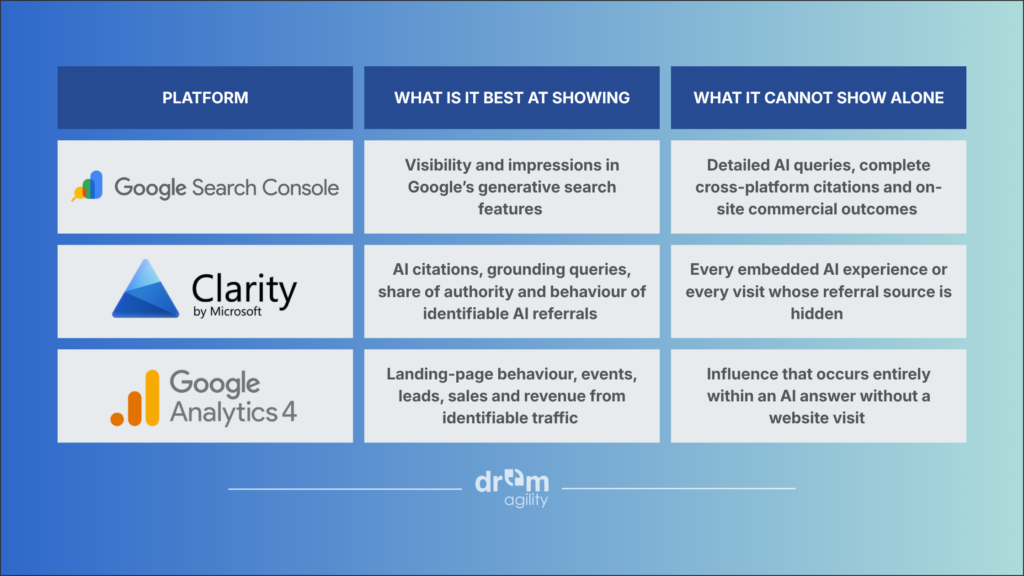
The apparent gaps are not necessarily failures in the data. They reflect different stages of the journey:
Search Console measures exposure. Clarity measures citation and observed behaviour. GA4 measures on-site action and commercial value.
A practical measurement framework
Businesses should begin with a baseline rather than chasing one all-encompassing AI metric.
1. Separate commercial and informational pages
Group pages by purpose: product and service pages, lead-generation pages, comparison content, advice articles and troubleshooting resources. This prevents a fall in low-intent research traffic from obscuring performance on pages that generate revenue.
2. Compare visibility, visits and outcomes
Monitor three layers:
- Visibility: impressions and cited pages.
- Visits: clicks and identifiable AI-referred sessions.
- Outcomes: qualified leads, booked meetings, purchases and revenue.
3. Look for divergence
The most useful insights often appear when the figures move in different directions. Falling article traffic alongside rising AI citations could indicate that content is still influential, but users are consuming it elsewhere. Stable revenue despite fewer organic sessions may mean the lost visits were largely informational. Falling commercial traffic and conversions requires much faster investigation.
4. Fix campaign tagging before paid AI grows
Agree a consistent UTM convention for AI advertising now. Without it, future paid traffic may be mixed into referral, direct or inconsistent source categories, making meaningful comparison much harder.
5. Judge content by influence as well as clicks
Informational content still has value if it builds authority, earns citations and guides users towards the brand. But its success criteria need to evolve. Sessions alone are no longer an adequate measure.
The real risk is measuring a new search landscape with an old dashboard
Search is becoming less about presenting ten links and more about producing an answer. That inevitably reduces some of the exploratory traffic websites once received.
The response should not be to assume that search is dead, nor to declare every lost session irrelevant. It should be to identify which behaviour has changed and whether the change reaches the bottom line.
Google Search Console, Microsoft Clarity and GA4 each reveal a different part of that picture. Used together, they allow a business to distinguish between disappearing research clicks, continued influence inside AI answers and genuine losses in commercial demand.
That distinction matters because the goal was never traffic for traffic’s sake. The goal was profitable customers. AI search simply makes it more important to measure the difference.
Want to understand how AI search is affecting your business?
AI is changing how people discover, research and choose businesses. The challenge is knowing what that change means for your visibility, traffic and revenue.
At Dream Agility, we help businesses understand their AI search visibility and identify where the biggest opportunities are.
Want to see what AI search means for your business? Get in touch with Dream Agility today.